|
You’re standing in front of the building. The questions are who owns it, what it last traded for, and what’s leasing around it — and until now, the answers were on a screen back at the office.
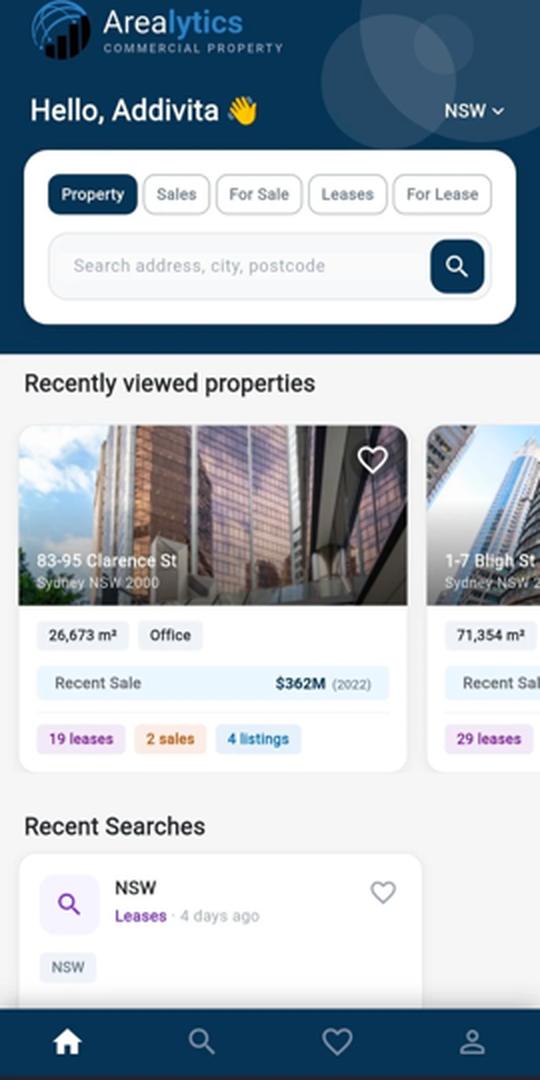
The app has been rebuilt around a full home screen. Open it and the market is already there — your last searches, the properties you were looking at, and every market you cover.
|
| |
It picks up where you left off
Search market evidence — Property, Sales Transactions, Sale Listings, Lease Transactions, Lease Listings — with type-ahead on addresses, cities and postcodes. Recently viewed properties and recent searches sit right below, tappable to re-open or re-run. Switch active market from the header — NSW, VIC, QLD, WA, SA — and every search follows.
|
|
Same search. No reset.
Toggle between map and list without losing your search or your filters. A floating search-type pill switches between All Properties, Lease Listings, Sale Listings, Lease Transactions and Sales Transactions without opening a menu. Simply move around the map and the results update automatically as you explore. Tap any pin to open a preview panel with key stats and active market evidence based on your search — an overview at a glance, before deciding whether to explore the full record.
|
|
The full record, not a summary
Key data points up front, then four market evidence tabs — Sales Transactions, Sale Listings, Lease Transactions, Lease Listings — with cards that expand into the full transaction detail. With a search running, a Matched only / Show all toggle separates what fits your criteria from the complete record set. For strata and complex assets, a side drawer lists every lot and child building, each one a tap from its own detail screen.
|
|
Save it. Note it. Come back to it.
Favourite any property or search, and name your saved searches so they’re waiting next time. Save a property and a notes field opens up — client interest, ownership detail, market context. Notes are editable from the Favourites screen, the property detail or the list card, and they persist between sessions.
|
|
From the listing to the call, without leaving the card
Lease Listings and Sale Listings carry agent contact inline. Tap to call or SMS, or open an email with the subject and body already populated from the property and listing context.
|
|
|
Users can set their default market, manage account preferences from My Profile & review Terms & Conditions.
|
| |
|